GPT Image 2.5 Officially Released: Faster, More Precise, Truly "Jailbreak-Free" HD Generation
OpenAI has officially released its next-generation image model, ChatGPT Images 2.5. This isn’t just a bump in resolution or a handful of new tricks — it’s a wholesale upgrade across generation speed, image consistency, precise editing, multi-turn modification, reference-image understanding, and creative tooling.
More importantly, ChatGPT Images 2.5 is now rolling out to ChatGPT, ChatGPT Work, and Codex users across Web, desktop, and mobile. At the same time, OpenAI introduced two API variants: GPT-Image-2.5 Flare and GPT-Image-2.5 Sunburst.
After spending hands-on time with it, my biggest takeaway is simple: GPT Image 2.5 is faster, more accurate, and far better at “understanding what you actually want.” Compared to the previous generation, it’s also notably more open — images that used to require prompt-level jailbreaks now render in seconds.
The prompt we used
Create a series of photo-realistic vintage-baker portraits in 9:16 ratio, with a soft, intimate POV.

Use the same beautiful adult East Asian woman throughout the set, with direct eye contact, realistic skin texture, soft natural hair, and a sensual-but-natural presentation. She's wearing a simple sleeveless summer kitchen dress in ivory white or a soft cream tone, paired with a light apron and a delicate headscarf. Set the scene in an elegant retro Shaker-style kitchen with mushroom-grey cabinets, dark-walnut counters, warm grey stone surfaces, refined brass hardware, and clean summer daylight.

Focus the batch on body language, eye contact, and pose geometry rather than big action scenes. The woman must stay as the clear visual focus in every frame.

Include elegant kitchen-portrait moments such as:
* sitting on the counter, one long leg stretched out, the other foot resting on a stool
* offering the viewer a slice of strawberry shortcake
* sitting backward on a high stool, arms draped over the chair back
* reaching upward in the kitchen while holding a playful connection with the camera

Keep the mood retro, feminine, playful, and lightly flirty. Each image should feel like a moment captured in the same retro kitchen, with the viewer standing close beside her.

Vary the face angles across the series. Don't repeat the same three-quarter profile in every shot. Mix direct eye contact, side glances, silhouette-based eye contact, looking up, and a slightly lowered chin with upturned eyes, so the set feels alive rather than the same face pasted onto different poses.

Use pose, shoulders, waistline, long legs, and eye contact as the primary sources of visual interest. Posture should feel relaxed but intentional, with a lightly editorial quality.

Keep props secondary. If they appear, keep them small and supporting — a slice of strawberry shortcake, a wooden spoon, a whisk, a small tray, a folded linen cloth, or a small glass jar. Avoid oversized opaque objects, large bowls, or bulky cookware that would block the torso or steal focus from the model.

Lighting should be soft, clean, and summery. Keep the overall color balance neutral to slightly warm. The retro feel must come from the kitchen style, wardrobe, textures, and atmosphere — not from heavy yellow or orange filters. Skin stays natural, ivory wardrobe stays ivory, grey cabinets stay grey.

The final result should feel intimate, stylish, feminine, retro, and editorial, with realistic anatomy, believable skin, credible expressions, and a kitchen environment that feels lived-in but elegant.

Avoid repeated face angles, stiff poses, oversized props, yellow color cast, orange skin, distorted hands, exaggerated wide-angle body warping, cluttered backgrounds, complex strap designs, and obvious AI-generation artifacts.
So how does OpenAI’s freshly-released GPT Image 2.5 compare to the open-source, hugely popular Z-Image text-to-image model? Z-Image is famous for being unfiltered — jailbreak-free generation of unmentionable content. Let’s put them through their paces.
Setup walkthrough
1. Install ComfyUI
Official download: https://comfy.org/
2. Install the unfiltered Z-Image model
One-click bundle (skip the manual setup)
If you don’t have time to follow a tutorial, don’t want to download and install manually, or your network won’t allow it, you can use this all-in-one model bundle for a hands-off setup.
Z-Image model bundle: Download via Quark · Mirror download
Author’s pick — TDM Fast downloader: https://activate.tdmfast.com/aff.php?c=F92639
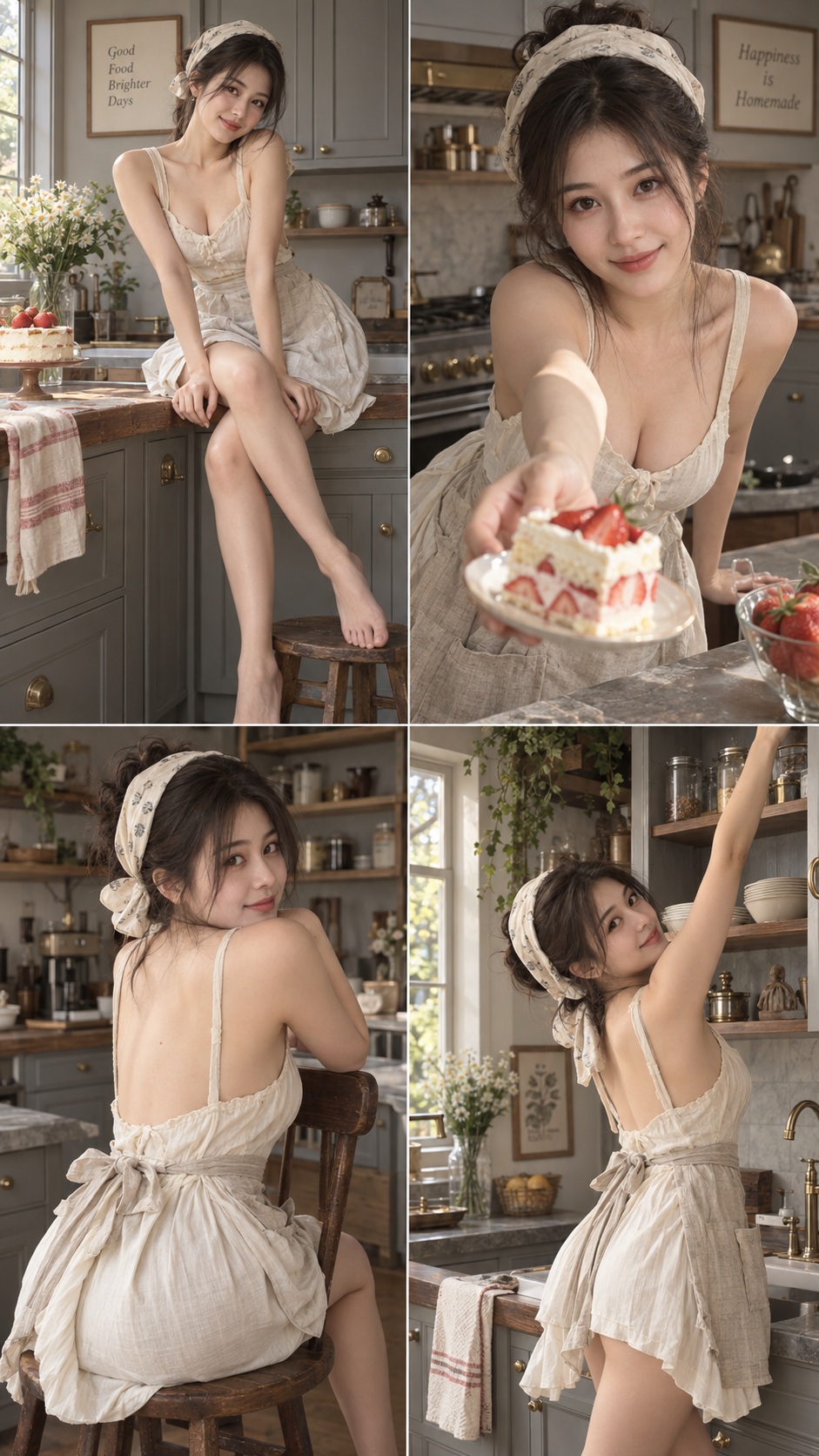
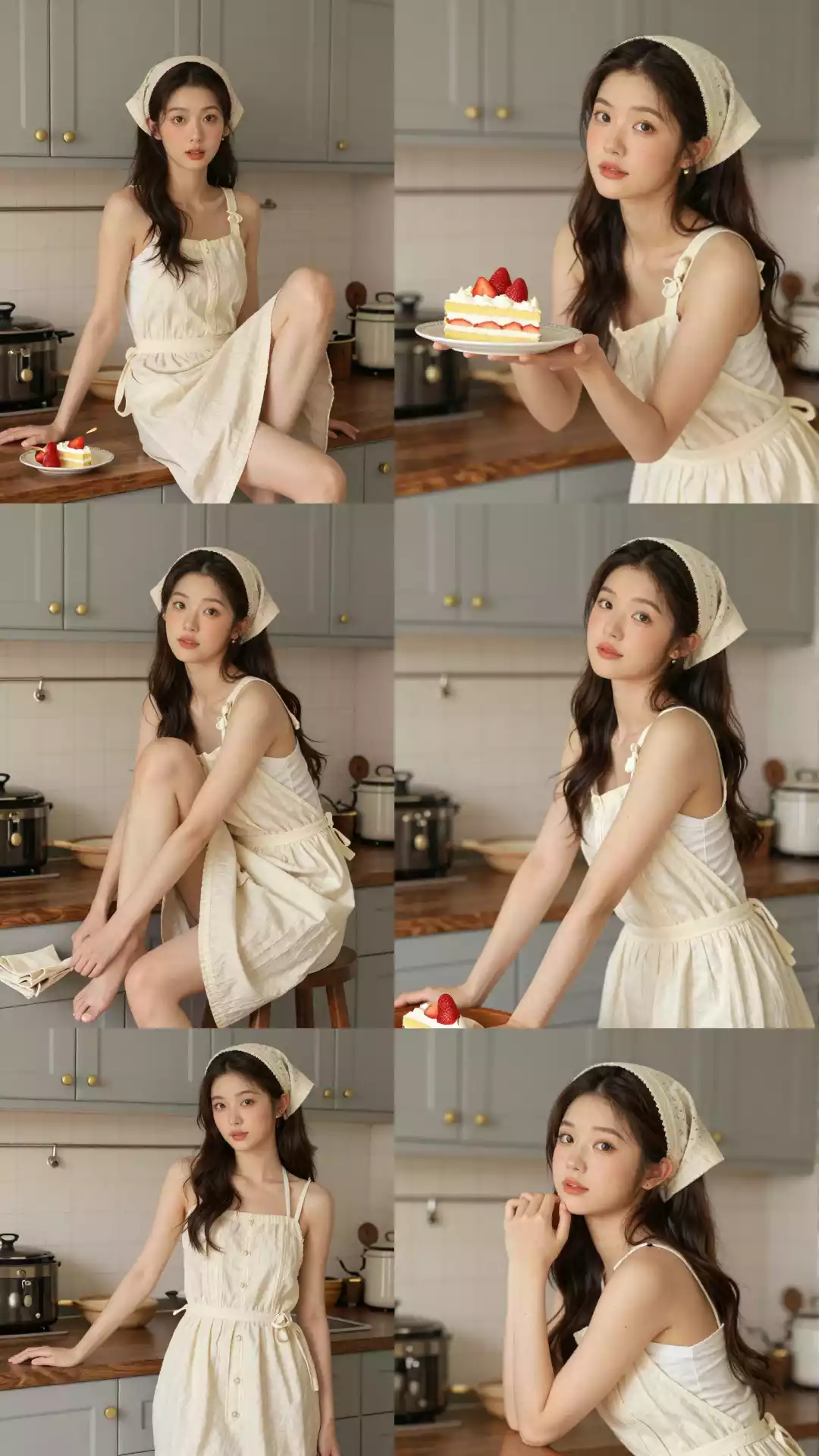
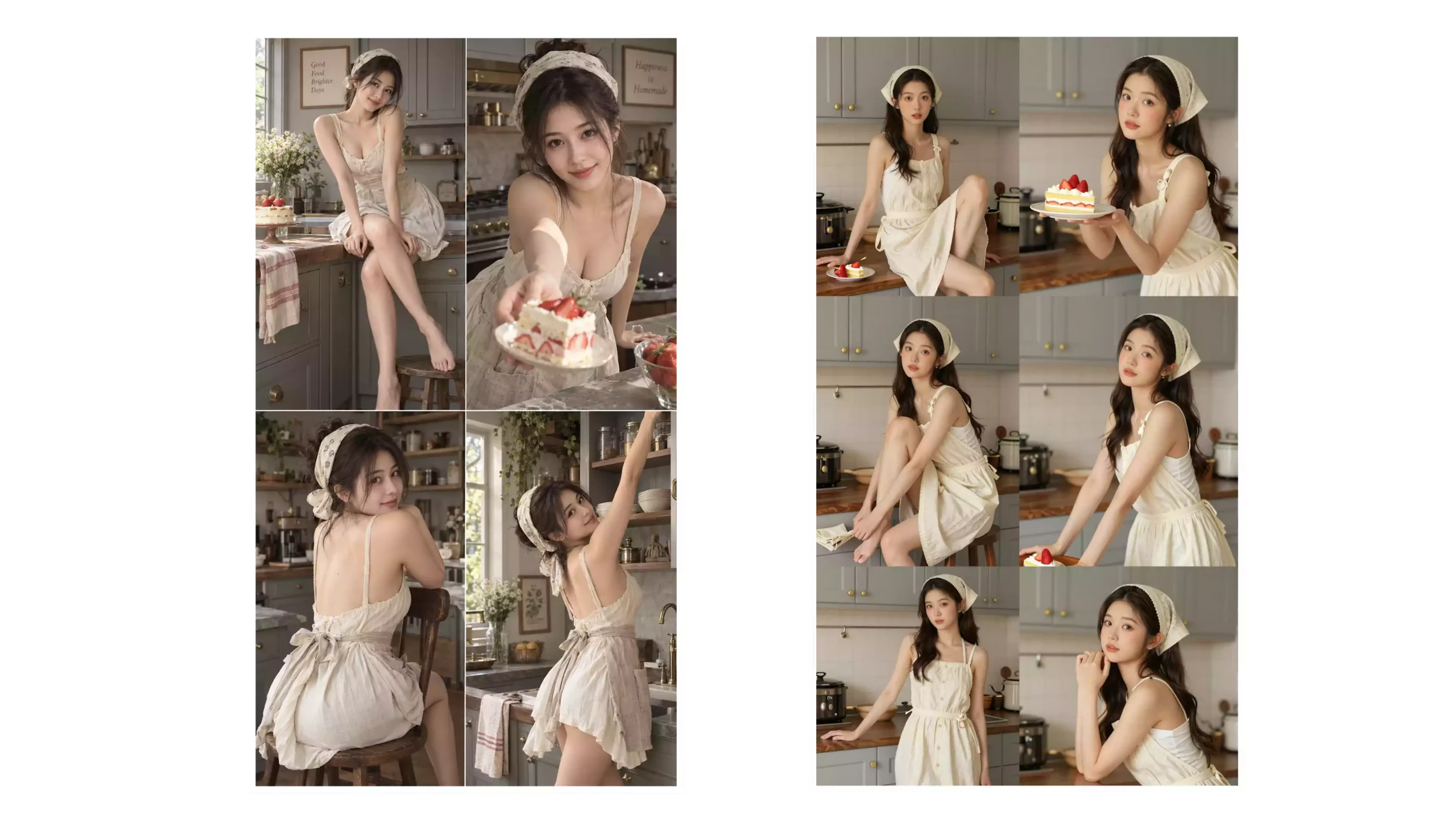
Using the same prompt above, here are the results — GPT Image 2.5 on the left, Z-Image on the right. Which do you think wins?
GPT Image 2.5 leans into detail and refinement; Z-Image leans into realism and unfiltered generation. Honestly, the gap between them has shrunk dramatically. And of course Z-Image is fully free and open-source, so you can generate anything you need locally. We already published a full local-deployment tutorial for Z-Image — if you missed it, see the video walkthrough below (includes the jailbreak-tier model download):
Z-Image upgraded: 8 GB VRAM, unfiltered, ultra-fast, fully local
1. So what actually changed in GPT Image 2.5?
OpenAI summarized this upgrade around a handful of keywords:
- Faster image generation
- Higher image fidelity
- More precise image editing
- Better consistency across multi-turn edits
- Stronger complex-instruction understanding
- Better text and layout handling
- A brand-new Sketch drawing feature
- Templates library
- Comment-based precise editing
Of these, the one I think matters most isn’t pure image quality — it’s “keep what shouldn’t change, unchanged.”
That’s the long-standing hard problem in AI image generation. OpenAI says Images 2.5 better preserves the identity of people and objects in reference-image generation, while making lighting, texture, and detail more natural.
2. The biggest leap: image consistency
If you use AI image generation often, you know this pain point well.
Say you generated a character portrait, then told it:
Change the outfit to black.
In theory, the AI should only modify the clothes. But older models often “helpfully” also changed:
- The face
- The hairstyle
- The hands
- The background
- The lighting
- The pose
- Sometimes even the entire composition
You end up with “a similar image” rather than a precise edit of the same image.
GPT Image 2.5 clearly strengthens this capability. OpenAI explicitly emphasizes that Images 2.5 changes only what you asked it to change, while preserving the rest of the details as faithfully as possible — even on complex subjects and busy backgrounds, the original composition and visual identity hold up better.
This matters a lot in real creative work. Because real commercial design usually isn’t:
“Generate me a new image.”
It’s:
“Keep everything else, just change this bit.”
That’s the actual capability a professional image editor needs.
3. Multi-turn editing finally becomes reliable
Another huge upgrade is consistency across multi-turn edits.
In the past, editing an image iteratively often looked like this:
- Round 1: Change the outfit to red.
- Round 2: Change the background to a city.
- Round 3: Make the expression more natural.
- Round 4: Change the shoes to white.
By the end, you’d often find the person wasn’t even the same person you started with.
GPT Image 2.5 targets this problem head-on. OpenAI says that across longer ChatGPT conversations, Images 2.5 more reliably follows a chain of edit instructions — it preserves the changes you’ve already made, and builds subsequent edits on top of those, rather than trampling earlier details.
This matters disproportionately for commercial design. To produce a complete brand campaign, for example, you can lock in the character and the product first, then iterate:
Character → Background → Product → Copy → Color → Composition
…without having to regenerate from scratch at every step.
4. Speed also got noticeably better
Beyond quality, speed was a major focus of this release. OpenAI says ChatGPT Images 2.5 reduces generation latency by up to 50% versus Images 2.0.
What does that mean? Previously you might have caught yourself thinking, mid-prompt:
“Should I just rewrite the prompt?”
Now you can more quickly:
Generate → Edit → Regenerate → Edit again.
For creators, that speed bump is more important than it sounds. Because the whole point of AI creation isn’t one perfect output — it’s fast iteration. The faster the loop, the lower the cost of trying things.
5. GPT Image 2.5 + Sketch: express ideas even if you can’t draw
One of the most interesting additions this round is Sketch.
Sometimes you have a very clear picture in your head but can’t easily put it into words. For example:
The character stands on the left. The product is on the right. A huge light band runs down the center. The background is a city.
Pure text descriptions drift easily. Now you can do this directly in ChatGPT:
Sketch a few quick strokes.
Even rough lines work as visual reference. OpenAI’s docs explain that Sketch lets users draw a sketch right inside ChatGPT, and the model generates a complete image from it. You don’t need professional drawing skills — just enough to express basic composition, outlines, or ideas. Type “@Sketch” to use it.
This actually changes how humans and AI communicate. Before:
Idea → Prompt → AI
Now:
Idea → Sketch + Prompt → AI
For designers, photographers, and video creators, sketches are often far more precise than text.
6. From a few messy lines to a real, usable design
This is one of the parts that genuinely surprised me about GPT Image 2.5.
You don’t even have to draw well. Scribble a few lines and tell the AI:
“Generate a high-end commercial ad based on this composition.”
The AI will infer from these rough visual cues:
- Composition
- Subject placement
- Visual hierarchy
- Light and shadow
- Color
- Style
- Spatial relationships
…and turn a rough sketch into a complete visual.
That means:
AI is lowering the barrier to “expressing an idea” even further.
No Photoshop? Fine. No Illustrator? Fine. Can’t draw at all? Also fine.
As long as you can roughly show:
“I want it to look like this.”
…the rest can be left to AI.
7. Text and complex layouts become a first-class concern
AI image generation has always had one obvious weak spot:
Text.
Posters, ads, product packaging, infographics — the picture may be gorgeous, but text often shows:
- Spelling mistakes
- Garbled glyphs
- Mixed fonts
- Misaligned layout
- Missing information
GPT Image 2.5 significantly strengthens its understanding of complex visual instructions and layout. OpenAI says Images 2.5 understands real-world information more accurately and can handle more complex layouts, including transparent backgrounds.
This makes it especially suited for:
Creative advertising
- Product ads
- Fashion posters
- Sports campaigns
- Brand key visuals
- E-commerce hero shots
Commercial design
- Posters
- Flyers
- Merch
- Product packaging
- Social media graphics
Content creation
- YouTube thumbnails
- Video illustrations
- Blog hero images
- Infographics
- Social media posts
8. The AI-creative-ad workflow is changing
Producing a single ad image used to mean:
Research references → Write copy → Source assets → Composite in Photoshop → Color grade → Layout → Revisions
Want ten different versions? That’s a serious chunk of work.
With GPT Image 2.5, you can:
Generate multiple creative directions in one go.
For the same product, you might ask for:
- Tech style
- Minimalist
- High-end luxury
- Cinematic
- Sports ad
- Futurist
Then pick one direction and keep refining.
For e-commerce and advertising, that’s a huge shift. An idea that used to take hours — or a full day — to develop can now produce dozens of directions in minutes.
AI won’t necessarily replace designers directly, but it is collapsing the cost of creative validation.
9. GPT Image 2.5 is entering the “video workflow” in earnest
More interestingly, GPT Image 2.5 isn’t limited to static images. We’re already seeing some genuinely cool pipelines:
GPT Image 2.5 → Image → AI video model → Video
For example, use GPT Image 2.5 to produce style-consistent keyframes, then feed them to a video model to add motion. The community has been combining GPT Image 2.5 with Hailuo H3 and Seedance 2.5 to produce AI video.
This pipeline is actually quite sensible:
GPT Image 2.5 handles visual design and frame consistency. The video model handles making it move.
That’s how AI image and AI video finally start composing together.
10. GPT Image 2.5 Sunburst: the version actually worth watching
If you’re using the API, you also need to know about the two new models:
GPT-Image-2.5 Flare
Flare leans toward:
Speed + quality + large-scale generation.
OpenAI says Flare is the default API choice for most apps — better quality, editing, and speed than GPT-Image-2, with latency down about 50%.
It fits:
- Social media content
- Creator tools
- Product experiences
- E-commerce
- Visual search
- Rapid prototyping
- Mass image generation
GPT-Image-2.5 Sunburst
Sunburst leans toward:
High quality + high precision + professional creation.
OpenAI positions it as the model for advanced visual workflows — anywhere you need strict editorial control:
- Commercial advertising
- Product photography
- Brand visuals
- High-quality creative work
- Professional image editing
The trade-off is longer generation time.
In short:
Flare = faster Sunburst = more refined
11. Sunburst’s real killer feature: change only what you want to change
This is one of the most important capabilities in GPT Image 2.5 right now.
Say you have an existing character ad. Now you ask:
Replace the phone in their hand with a bottle of drink.
Ideally the result should be:
Phone becomes drink.
Not:
Phone becomes drink + face changes + background changes + lighting changes + clothes change.
Sunburst is built precisely around this kind of precise edit.
InVideo recently demoed an interesting pipeline: use GPT-Image-2.5 Sunburst to replace objects in a frame precisely, then use InVideo’s AI editing agent to auto-build a timeline and align the edited frames for a match-cut effect.
What’s genuinely exciting about that pipeline isn’t any single pretty picture — it’s:
AI is starting to participate in the entire video-production workflow.
From:
Image generation
To:
Image editing
To:
Timeline assembly
Finally:
Video editing
More and more of this is being handed off to AI agents.
12. Templates: you don’t need to know how to write a prompt to start creating
In addition to Sketch, OpenAI also shipped Templates this round.
For most casual users, the biggest obstacle isn’t that the model isn’t powerful enough — it’s:
Not knowing how to start.
So Images 2.5 ships with templates for common creative formats:
- Poster
- Merch
- Product photo
- Social media content
Pick a template, fill in your content, design elements, and style, and you’re done.
This lowers the AI-creation bar one more notch.
13. When you share an image, you can now share the prompt too
Another practical feature: when you share an image, you can choose to share the prompt that produced it alongside it. So when someone sees your work, they can immediately keep iterating from the same starting point.
For example:
Your photo + my prompt
…becomes:
Your photo + same prompt = a version that’s fully yours.
This gradually turns AI image creation into a new form of content distribution:
The image is content. The prompt is content too.
14. What is GPT Image 2.5 actually changing?
If you only look at parameters, resolution, and generation speed, GPT Image 2.5 might feel like a routine model bump.
But line those capabilities up together, and the shift is enormous.
Previously:
Person → learn Photoshop → learn prompting → learn editing → produce the work
Now:
Person → express the idea → AI handles execution
And Sketch solves:
“I can’t describe it.”
Precise editing solves:
“I only want to change this part.”
Multi-turn consistency solves:
“Don’t undo what I already did.”
Templates solve:
“I don’t know how to start.”
Faster generation solves:
“I want to iterate quickly.”
AI agents then take that one step further:
“Can AI do all of this end-to-end?”
15. Closing thought: AI image generation is moving from “generator” to “creative partner”
What makes GPT Image 2.5 genuinely worth paying attention to isn’t that its images look prettier. It’s that:
AI is increasingly understanding “what the creator actually wants to change.”
From the old:
“Generate me an image.”
To increasingly:
“Here’s my sketch — go with this composition.”
“Keep the character, just change the outfit.”
“Stay on-brand, give me five ad variants.”
“Turn these frames into a complete video.”
AI image generation is moving from a standalone content-generation tool toward a core piece of infrastructure inside the entire creative workflow.
And GPT Image 2.5 may just be the beginning. The way content gets made in the future probably won’t be:
One person mastering Photoshop, Premiere, After Effects, photography, and design.
It will more likely be:
One person + a pipeline of AI agents.
You bring the ideas. AI does the execution.
And that — more than any single pretty picture — is how AI is really going to reshape the content industry.